
01 / 10
Three scenes for a Bigfoot vlog, comedy, or sighting
These are the three scene types on this page: a handheld forest selfie, a comic campsite moment, and a dusk sighting. Each example is a text-only Seedance 2.0 Fast clip. Applying a scene puts its prompt in the workbench and does not replace your duration, aspect ratio, or image.
Forest selfie vlog
A 9:16 handheld walk on a misty redwood trail at sunrise. A fictional chocolate-brown Bigfoot holds the camera, with a green fern behind the left ear and no burned-in captions, subtitles, or watermarks. Use this when you want a Bigfoot vlog generator starting point: one trail, one camera, one short line in the prompt.
Comic daily life
A 16:9 medium shot at a small forest campsite in warm morning light. The clip stays on one continuous moment: the creature sits on a log, holds a tiny enamel mug, and stays beside a campfire, with the fern marker visible and no burned-in captions. It is a comic beat, not a horror scene.
Mysterious sighting
A 16:9 hiker-point-of-view walk at dusk. Between tall pines, a distant shaggy bipedal figure moves left to right and ends partly hidden by a tree. Facial features and the fern marker are not readable at this distance, so this clip is a sighting framing example, not a close-up of the creature.
02 / 10
One forest-selfie example, from prompt to frames
The detailed example below uses the same forest-selfie clip from the scene row above. It is not a fourth result. It is one 5-second, 720p, 9:16, text-only clip. The stills come from that single walk. They are not an automatic multi-shot edit.
This detailed example uses the same forest-selfie clip and is not a fourth result.
Prompt used for this example
This example used this English prompt: a fictional adult Bigfoot films a handheld selfie vlog on a misty redwood trail at sunrise; dense shaggy chocolate-brown fur, amber-brown eyes, a small green fern behind the left ear, long arms, oversized feet; wide-angle selfie camera, 9:16, 5 seconds, slight handheld sway, no cuts; he looks into the lens and speaks the line Morning from the woods; natural birds and soft wind only; no music, burned-in captions, subtitles, on-screen text, or watermark. No input image was attached.
Settings used for this example
This example used Seedance 2.0 Fast at 5 seconds, 720p, and 9:16, from text only, with no reference image. Seedance 2.0 Fast can generate native audio; spoken lines belong in the prompt. The workbench shows the current credit quote before you submit, and this page does not list a fixed credit price.
Stills from the same clip
These stills show the same handheld forest selfie: chocolate-brown shaggy fur, misty redwoods at sunrise, the camera in the foreground, and a green fern behind the left ear. No burned-in captions, subtitle bars, or watermarks are visible. One still shows a slightly open mouth; that is a visual observation only and is not lip-sync proof.
03 / 10
How to make a Bigfoot video on this page
The shortest path is one scene, one prompt, one clip. Stay on this workbench so the scene and description you already chose are still there.
01
Choose a scene
Pick forest selfie, comic daily life, or mysterious sighting. That fills the description with the matching prompt. Duration, aspect ratio, and any attached image stay as they are, so you can keep those settings while you change the story.
02
Edit the prompt and optional image
Rewrite the character, place, action, and camera until the moment is specific. Put any spoken line in the same prompt. You can generate with text only, or attach one optional image as a character reference. This page does not take a reference video and does not offer a subtitle field.
03
Check the quote, then generate
Confirm duration (4-15 seconds, default 5) and resolution (480p or 720p, default 720p). The workbench shows the actual credit cost before you submit, and duration affects that quote. If you are not signed in, the page asks you to sign in. If credits are too low, it points you to buy credits. Preview the clip in the same workbench; the examples above are not your result.
04 / 10
Bigfoot video prompts: character, place, action, camera
A useful prompt names four things: who is on screen, where they are, what they do, and how the camera sees it. The starters below are the three scene prompts this page can apply. Applying one replaces the description text only.
01
Character
Keep a short, reusable description: fur color, eye color, body scale, and one marker such as the green fern behind the left ear. Write fictional adult Bigfoot, Yeti, or Sasquatch traits in the prompt. A marker helps you check later; it does not guarantee a match across clips.
02
Place
Name one location and the light. The shipped scenes use a misty redwood trail at sunrise, a small forest campsite in warm morning light, and tall pines at dusk. Extra locations in the same prompt often pull the shot away from the action.
03
Action
Ask for one beat in a 4-15 second clip: walking and talking, looking over a mug, or crossing a gap between trees. Do not ask this page to assemble several shots into an edit. Each generate is one clip.
04
Camera
Say whether the camera is a wide-angle selfie, a locked-off medium shot, or a handheld hiker point of view. Forest selfie is written for 9:16; the other two scenes are written for 16:9. Applying a scene does not change the aspect-ratio control, so set that yourself if you want it to match.
Forest selfie vlog
A fictional adult Bigfoot films a handheld selfie vlog while walking a misty redwood trail at sunrise. Same creature throughout: dense shaggy chocolate-brown fur, amber-brown eyes, a small green fern behind the left ear, long arms, oversized feet. Wide-angle selfie camera, 9:16, 5 seconds, slight handheld sway, no cuts. He looks into the lens and speaks the line Morning from the woods in a deep friendly voice. Natural birds and soft wind only. No music soundtrack. No burned-in captions, no subtitles, no on-screen text, no watermark.
Comic campsite
A fictional adult Bigfoot sits on a log at a small forest campsite in warm morning light. Same creature: dense shaggy chocolate-brown fur, amber-brown eyes, a small green fern behind the left ear, oversized feet. 16:9 medium shot, 5 seconds, locked-off camera with a tiny natural drift, no cuts. He carefully looks over a tiny enamel mug with both huge hands, then speaks the line This mug is tiny. Campfire crackle and forest ambience only. Playful documentary-comedy, not horror. No music. No burned-in captions, no subtitles, no on-screen text, no watermark.
Dusk sighting
A mysterious Bigfoot sighting from a hiker handheld point of view at dusk. 16:9, 5 seconds. Between tall pines, a tall shaggy chocolate-brown bipedal silhouette with long arms and oversized feet moves slowly left to right, then pauses half-hidden. Restrained documentary, no jump scare, no monster movie lighting. An unseen hiker whispers the line Did you see that. Crickets and a distant creek only. No music. No burned-in captions, no subtitles, no on-screen text, no watermark.
05 / 10
Character reference for the next Bigfoot scene
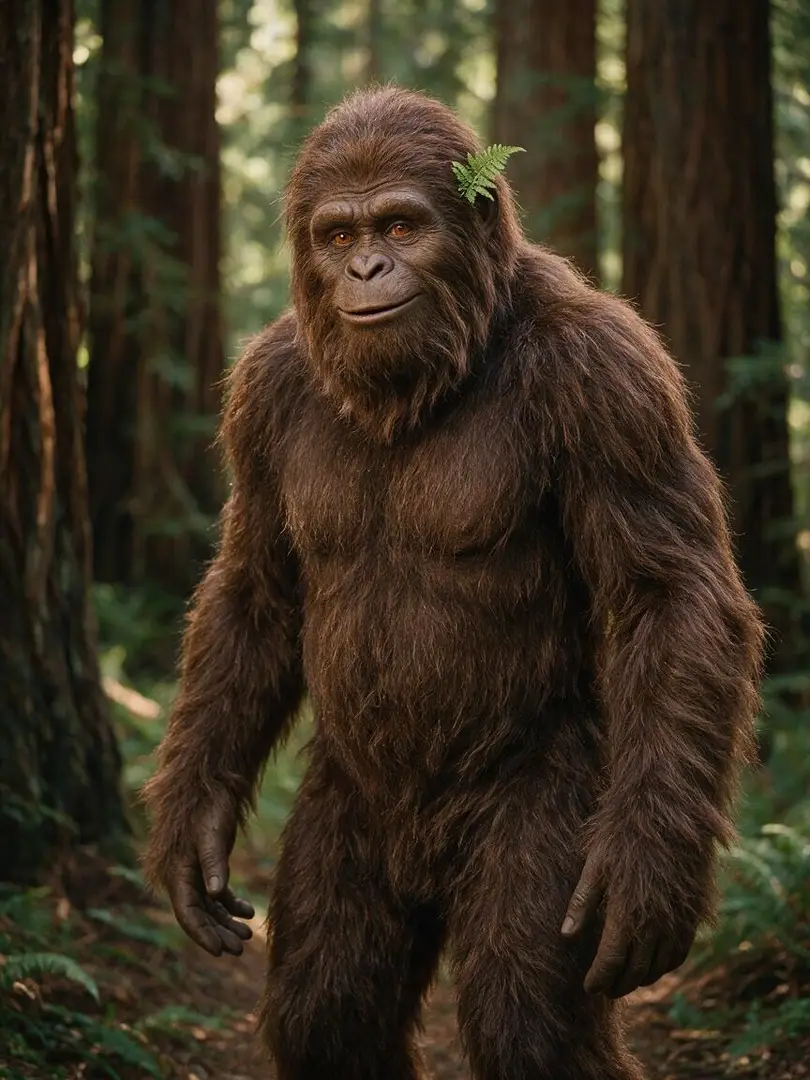
If you want a series, keep the same written traits and, if you choose, one optional reference image. The still below is a visual guide. It is not a generated video, and it is not presented as a demonstrated one-image result.
What the character still shows
The still is a 3:4 Seedream 5.0 image, 810x1080: a fictional chocolate-brown Bigfoot standing in redwood shade, amber-brown eyes, and a small green fern behind the left ear. Use those visible traits in your prompt if you want a similar look. It does not prove motion, campsite action, or a dusk sighting.
How to reuse a look without overclaiming it
Copy the same fur, eyes, scale, and marker into the next prompt. You may attach one image as a reference. Check face, fur, and scale after each clip. Absolute character consistency is not promised. The still and the three scene clips are separate, and there is no side-by-side comparison that proves they are the same character.
When a reference image is the wrong tool
Skip the image if you only need a new scene from text. The still is a visual guide and is not presented as a demonstrated one-image result. A distant dusk sighting is also a poor match check, because the face and fern are not readable.
06 / 10
Dialogue and audio on this Bigfoot AI video page
Seedance 2.0 Fast can generate native audio, and you can write a spoken line in the prompt. This page does not add a separate dialogue field, a subtitle switch, or a music-sync control. Speech, ambience, soundtrack quality, and lip sync on these examples are not confirmed and may vary.
Put the spoken line in the prompt
Write one short line next to the action, such as Morning from the woods or This mug is tiny. Keep the words tied to what happens on screen. There is no extra dialogue box on this workbench.
Native audio is available; example sound is not confirmed
Seedance 2.0 Fast can generate native audio. Put spoken lines in the prompt if you want them spoken. Speech, ambience, soundtrack quality, and lip sync on these examples are not confirmed and may vary.
No subtitle control on this page
The scene prompts ask for no burned-in captions, and the example clips do not show burned-in captions. That is not a subtitle feature. This page does not output a subtitle file or offer a subtitle setting.
On these three examples, speech, birds, wind, campfire, crickets, creek sound, soundtrack quality, and lip sync are not confirmed and may vary.
07 / 10
Bigfoot video settings, duration, and credit cost
This workbench uses Seedance 2.0 Fast. These are the settings you can change on this page. The number beside Generate is the current credit quote, not a fixed price. Duration affects that quote.
Duration
Choose 4 to 15 seconds. The default is 5 seconds, which is also the length of the three examples. A longer setting costs more because the quote follows duration. One generate is still one clip, not a longer edit.
Resolution
Choose 480p or 720p. The default is 720p, and the examples are 720p. This page does not offer 1080p.
Aspect ratio after a scene is applied
Forest selfie is written for 9:16; comic daily life and mysterious sighting are written for 16:9. Applying a scene fills the prompt only. Set the aspect-ratio control yourself if you want the frame to match the scene.
Credit cost before submit
The workbench shows the actual credit cost before you submit. Duration affects that quote. This page does not list a fixed credit price, a free allowance, or a speed estimate.
08 / 10
Bigfoot video generator FAQ
Answers below follow the current workbench: Seedance 2.0 Fast, optional one reference image, no subtitle control, and example speech, ambience, and lip sync that are not confirmed.
What is a Bigfoot video generator?+−
On VideoAny it is this page at /bigfoot-video-generator. You choose a scene, edit the prompt, and generate a short fictional Bigfoot clip with Seedance 2.0 Fast. The default path is text-only. One optional image can be sent as a reference. It is a scene-to-clip workbench, not a documentary of a real creature.
Do I need an image to make a Bigfoot vlog?+−
No. The default is text-only. You may attach one optional image as a character reference; it is not sent as a first frame. The character still is a visual guide and is not presented as a demonstrated one-image result. This page does not take a reference video.
Can a Bigfoot AI video include spoken lines?+−
Write the line in the prompt. Seedance 2.0 Fast can generate native audio. This page has no separate dialogue field and no subtitle control. Speech, ambience, soundtrack quality, and lip sync on the three examples are not confirmed and may vary.
Will one reference image keep the same Bigfoot in every clip?+−
Reuse the same written traits and, if you want, one reference image. That is a direction method, not a lock. Absolute character consistency is not promised. The still and the three scene clips are separate, and there is no side-by-side comparison that proves they match.
How much does a Bigfoot video cost?+−
The workbench shows the actual current credit quote before you submit. Duration affects that quote. This page does not list a fixed credit price or a free allowance. You need to be signed in to generate, and if your balance is too low, the page asks you to buy credits.
Can I make a Yeti or Sasquatch video instead?+−
Yes. Describe the fictional creature's appearance and setting in the prompt. Yeti and Sasquatch are related character uses on this same page, not separate URLs. An optional reference image can steer the look. Results vary, and there is no likeness guarantee.
Does this page add subtitles or cut multiple shots automatically?+−
No. There is no subtitle control or subtitle output here. Each generate is one clip. The comic and sighting examples stay on one continuous moment each, and the forest-selfie stills come from the same selfie walk. For a longer continuation of an existing clip, use Video Extend.
Create a Bigfoot video in this workbench
Return to the generator on this page with the scene and prompt you already chose. Check the current credit quote, then generate a 4-15 second clip. For other video tools, browse the tools directory instead of leaving this prompt behind.