
Cowgirl Pose AI Prompt: Camera Framing & Angle Guide for Video Creators
Master cowgirl pose AI prompts with precise camera framing, high-angle vs low-angle placement, and lighting recipes. Avoid limb distortion with repeatable VideoAny workflows.
| TL;DR | Detail |
|---|---|
| Primary Keyword | cowgirl pose AI prompt |
| Camera Angles | High-angle (45-60°) for torso emphasis; low-angle for dynamic power shots |
| Lighting | Rembrandt or split lighting for contrast and edge definition |
| AI Distortion Fixes | Negative prompts, reference-still locking, focal length 50-70mm |
| VideoAny Workflow | Test framing in image generator, then render video with locked camera |
A cowgirl pose AI prompt is a structured text command that directs an AI image or video generator to render a subject in a seated, straddling posture with specific camera framing, angle, and lighting parameters. The prompt must specify camera placement (high-angle or low-angle), torso alignment (upright or leaned forward), and lighting contrast to avoid common AI failures like limb distortion or blurred edges. This guide provides repeatable recipes for VideoAny's generator.
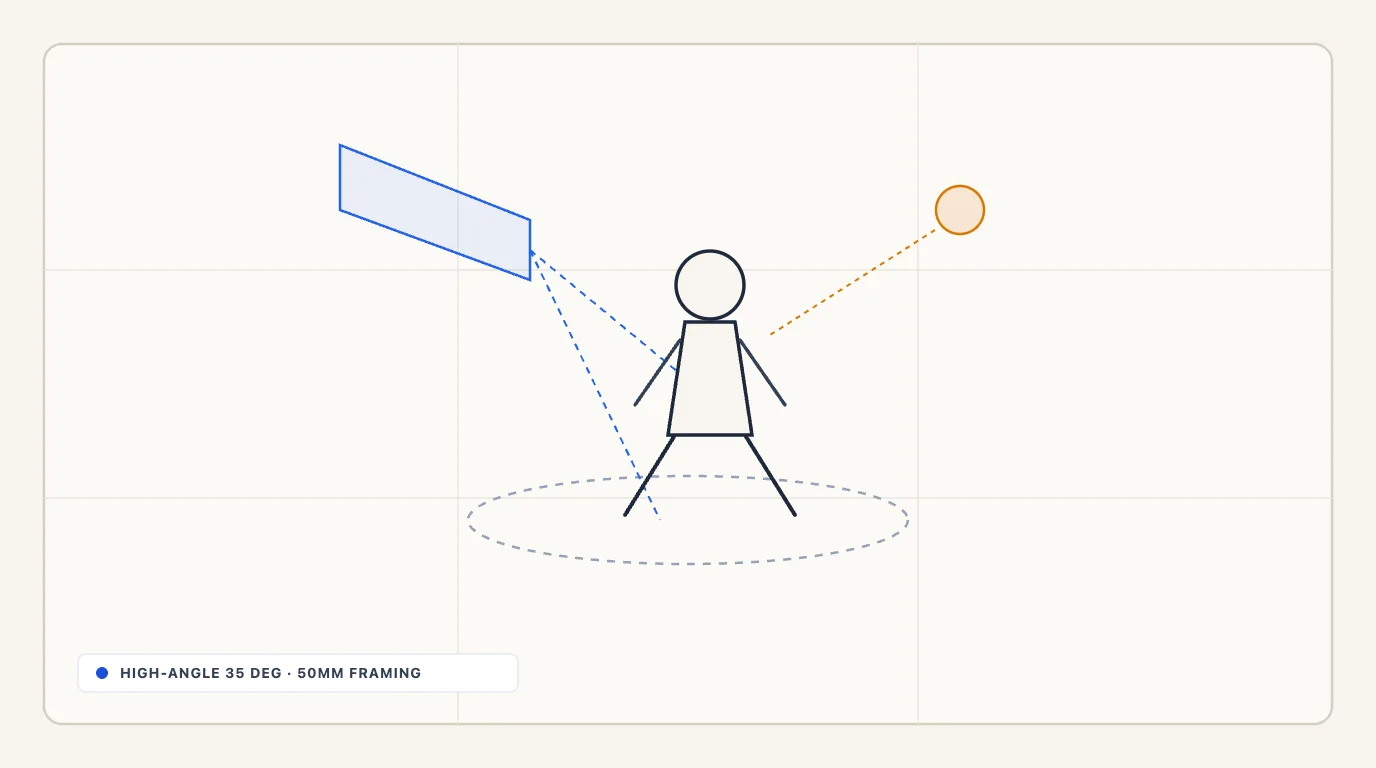
High-angle shots compress the torso vertically, emphasizing the subject's upper body and downward gaze. This angle reduces foreshortening of the legs and minimizes AI limb distortion. Use a 50mm focal length and position the camera 1.5-2 meters from the subject. Lighting: key light at 45 degrees above camera, fill at 30% intensity to define jawline and shoulder curves.
Low-angle shots create a power dynamic, exaggerating leg length and torso height. This angle is prone to AI distortion—add negative prompts like 'deformed legs, extra limbs, twisted spine'. Use 70mm focal length to compress perspective. Lighting: backlight at 45 degrees for rim light, key at 30% to avoid overexposing the face.
| Lighting Style | Key Light Position | Fill Light | Effect |
|---|---|---|---|
| Rembrandt | 45° above, 45° side | 30% intensity | Triangle highlight on cheek, torso definition |
| Split | 90° side | 10% intensity | Half-face shadow, dramatic edge separation |
| Loop | 30° above, 30° side | 50% intensity | Soft shadows, natural skin texture |
| Failure Mode | Cause | Fix |
|---|---|---|
| Twisted torso | No reference still | Lock a clean reference still before video generation |
| Extra limbs | Overlapping body parts | Use negative prompt 'extra limbs, merged arms' |
| Blurred edges | Low lighting contrast | Increase key-to-fill ratio to 3:1 |
| Foreshortened legs | Wide-angle focal length | Use 50-70mm equivalent |
- Test framing in image generator: Use VideoAny's image generator with a prompt like 'cowgirl pose, high-angle, 50mm, Rembrandt lighting, torso upright'. Adjust camera angle and lighting until the composition is stable.
- Lock reference still: Once satisfied, save the image as a reference still. This locks body geometry for video generation.
- Render video with locked camera: Use VideoAny's video generator with the same prompt plus 'camera locked, reference still: [image]'. Select model 'Wan 2.7 Spicy' for high motion fidelity.
- Review and iterate: Check for limb distortion in the first 10 frames. If present, adjust negative prompts or reduce camera movement.
Cowgirl High-Angle Framing
Recommended model: Wan 2.7 Spicycowgirl pose, high-angle camera at 50 degrees, 50mm focal length, Rembrandt lighting with key at 45 degrees and fill at 30%, torso upright, subject looking down, clean background, no limb distortionAvoid: deformed legs, extra limbs, twisted torso, blurred edges, wide-angle distortion
Cowgirl Low-Angle Power Shot
Recommended model: Seedance 2.0cowgirl pose, low-angle camera at 20 degrees, 70mm focal length, split lighting with key at 90 degrees and fill at 10%, subject leaning forward, dynamic leg extension, rim light on shouldersAvoid: deformed legs, extra limbs, twisted spine, overexposed face, merged body parts
A high-angle (45-60 degrees above subject) emphasizes torso alignment and downward motion, reducing limb foreshortening. Low-angle shots require careful negative prompting to avoid distorted legs. Test both on VideoAny's image generator before committing to video.
Use a clean reference still with locked camera position. Add negative prompts like 'deformed legs, extra limbs, twisted torso' and keep subject-to-camera distance consistent. VideoAny's reference-locking feature stabilizes body geometry across frames.
A 50-70mm equivalent focal length provides natural perspective without wide-angle distortion. For tight framing, 85mm isolates the upper body. Avoid below 35mm as it exaggerates limb proportions and triggers AI limb distortion.
Yes. Rembrandt or split lighting (key light at 45 degrees, fill at 30%) defines torso curves and separates subject from background. High-contrast setups reduce AI confusion in shadow areas, improving edge clarity in video output.
VideoAny uses reference-still locking and multi-frame consistency models (Wan 2.7 Spicy, Seedance 2.0) to maintain body geometry across motion. For two-person overlaps, a clean reference still with clear limb separation is recommended.
Start with the AI Cowgirl Generator to render your first video using the high-angle recipe above. For testing camera angles and lighting without consuming video credits, use the Pose Framing Tool first. Review pricing for cloud credit usage details.
More Posts
AI Bikini Video Prompt: Golden-Hour Beach Motion Guide for 5-Second Clips
Master AI bikini video prompts with golden-hour 9:16 framing, controlled breeze, and shallow-water stability. Generate coherent 5-second clips from reference images.

AI Jiggle Physics Motion Prompt: Constrain Amplitude for Natural Body Bounce in I2V
Master the AI jiggle physics motion prompt to prevent jelly distortion. Learn camera framing, motion amplitude control, and I2V prompts for crisp 5-second clips on VideoAny.
AI Lingerie Image and Video Prompt Guide: Editorial Lighting & Camera Framing
Master AI lingerie image and video prompt guide for satin, lace, and sheer mesh. Learn boudoir studio lighting, 85mm shallow depth of field, and I2V motion prompts for clean animated clips.