Black evening dress character study
 VideoAny
VideoAny AI
An anime ai generator turns a written description into a visual starting point, and the workbench on this page is built for exactly that. You supply a text prompt, choose the Seedream 5 Pro model, and set an aspect ratio; the tool returns a draft you can study, refine, or replace. Every control stays visible before you commit, and the credit cost is shown before you generate. Whether you are blocking out a crimson moon fashion illustration, a violet energy action composition, or a blossom lake fantasy portrait, the same anime ai generator workflow applies: describe the subject, lock the composition, and generate.
Every session in this anime ai generator begins with three decisions that shape the output before a single pixel is rendered. The model, the aspect ratio, and the resolution together determine what the workbench can interpret from your prompt. Seedream 5 Pro is the image model configured in VideoAny for this page, and the workbench is locked to it so you can focus on the brief instead of comparing engines. The controls are straightforward, but each one rewards a deliberate choice.
01
The anime ai generator workbench on this page is locked to Seedream 5 Pro, an image model configured in VideoAny that accepts a text prompt. You do not need to upload a reference photo; the image-to-image workbench with reference image input is a separate tool. Submitting a generation task requires an authenticated account, and the credit cost is shown before you generate. Because the model is fixed, your creative energy goes entirely into the written brief. The anime ai generator interprets subject, setting, light, and finish from your words alone, so every clause in the prompt matters.
02
The anime ai generator includes aspect-ratio controls that let you match the canvas to the destination before you type the prompt. A tall portrait ratio suits a single character study, while a wider frame gives you room for a layered background and secondary elements. Setting the ratio early keeps the composition intentional; the anime ai generator will fill the frame you define rather than forcing you to crop a strong draft later. The control sits right beside the prompt field, so you can adjust it as the visual brief evolves.
03
Use the resolution control only when the selected model shows it, and on this page Seedream 5 Pro keeps the option visible. Higher resolution can pull finer linework and fabric detail from your prompt, but it also changes the credit cost. The anime ai generator displays the cost before you generate, so you can weigh detail against budget in one glance. If you are testing a new composition, a moderate resolution often returns a readable draft faster and leaves credits for the refinement pass.
The core task of this anime ai generator is translating a written idea into a visual draft you can evaluate. You control subject, setting, light, and finish through the prompt, and the workbench returns a still you can compare, keep, or rewrite. The reference artwork on this page is pre-existing site material; no artwork was generated for this page and no specific selected-model output is demonstrated. The associated prompts are exercises, not verified input/output pairs, so treat them as composition studies rather than guaranteed recipes.
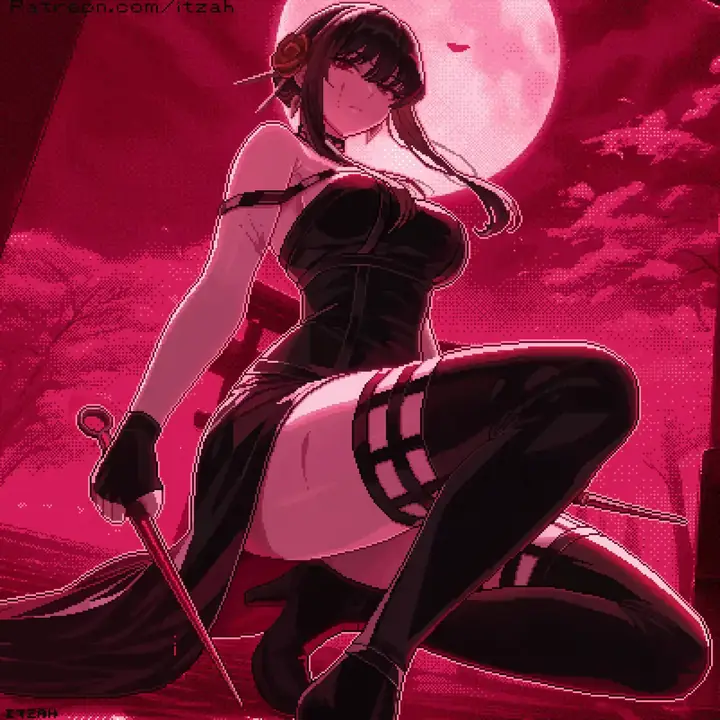
01
A dark-haired anime woman in a black slit dress and gloves against a crimson moon and cloud background shows how a single sentence can set mood, palette, and silhouette. When you use this anime ai generator, lead with the subject and the strongest visual anchor, then add fabric, light, and atmosphere in the next clauses. The crimson moon reference is a pre-existing illustration that demonstrates contrast and framing, not a direct output of the anime ai generator on this page. You can also think of this tool as an ai anime generator that responds to the same kind of descriptive stacking.
Anime fashion portrait, dark-haired woman in a black slit dress and long gloves, crimson moon and clouds behind her, low camera angle, strong pink rim light, clean linework.Open the workbench, type your first three-sentence brief, and generate a draft.
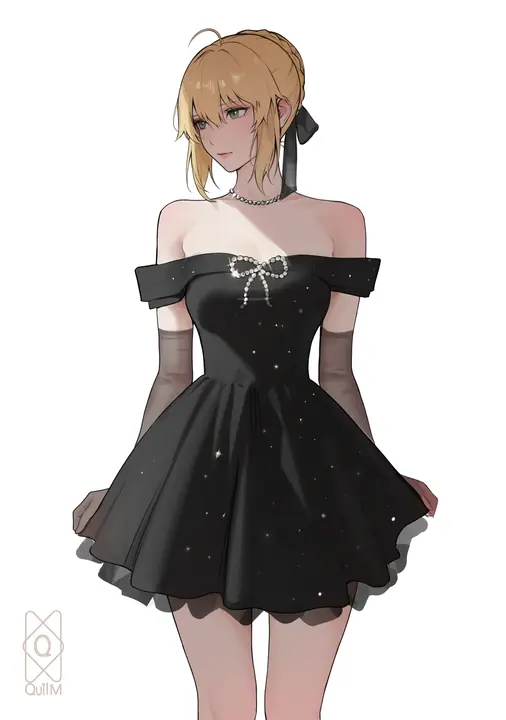
02
A blonde anime woman in an off-shoulder black evening dress with pearl details against a plain light background isolates the character from the environment so every design choice reads clearly. The anime ai generator rewards this kind of restraint: a simple background keeps the focus on fabric, posture, and expression. When you want to study a costume or a hairstyle, strip the setting back to a single tone and let the anime ai generator concentrate on the figure. The pearl details in the reference show how small texture words can survive the translation from text to image.
Anime character fashion study, blonde woman with hair tied back, off-shoulder black evening dress with pearl details, pale uncluttered background, three-quarter framing, restrained shading.Open the workbench, type your first three-sentence brief, and generate a draft.
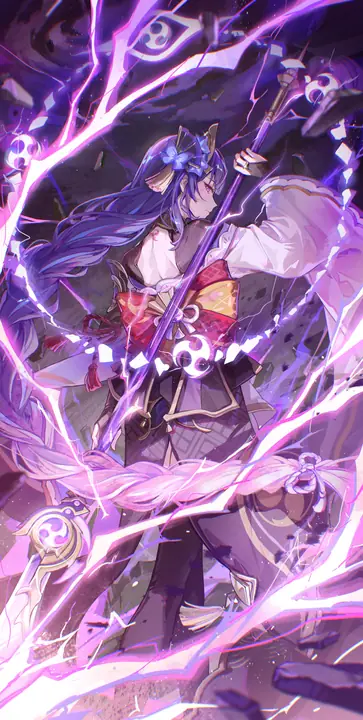
03
A purple-haired anime fantasy warrior with a raised sword, purple energy ribbons and a dark layered background packs motion, color, and depth into one frame. The anime ai generator can interpret action cues like a raised weapon or flowing ribbons when you place them early in the prompt. The dark layered background in the reference gives the bright violet energy room to read, a compositional trick worth repeating in your own briefs. The anime ai generator will attempt to honor every active element you name, so keep the motion words specific and the background deep enough to create contrast.
Anime fantasy action composition, purple-haired warrior holding a raised sword, flowing violet energy ribbons, dark layered setting, dynamic diagonal framing, crisp linework and luminous highlights.Open the workbench, type your first three-sentence brief, and generate a draft.
The same anime ai generator workflow supports a range of visual goals, from campaign boards that need consistent character framing to lesson art that sets a mood. Each scenario asks for a different balance of subject detail, background complexity, and light. The reference illustrations on this page are pre-existing site material that suggest directions, not outputs you should expect to replicate exactly. Use them as composition studies while you build your own briefs.
The reference gallery on this page contains existing adult anime illustrations that show different approaches to subject, setting, and light. These are pre-existing site materials, not outputs from the anime ai generator, and they are here to spark composition ideas rather than to demonstrate a specific model result. Study how each image balances the figure against the background, and borrow those proportions for your own written briefs.
Existing anime illustration references. Exercise prompts are not verified input/output pairs.
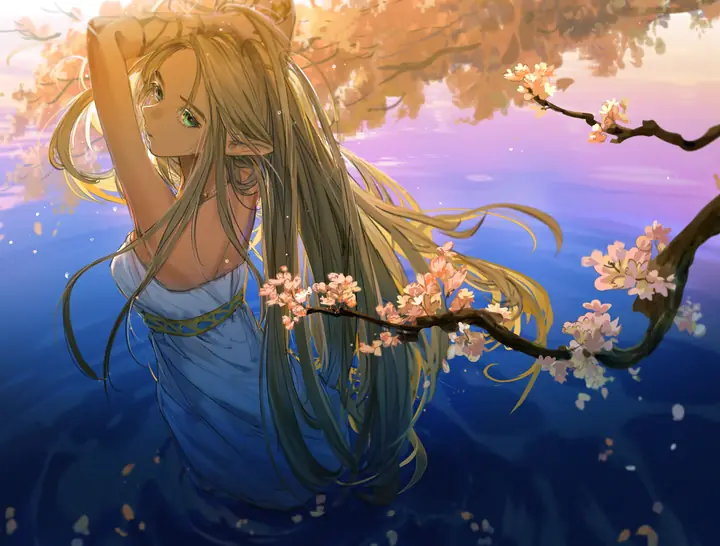
A long-haired blonde elf in a blue gown beside deep blue water, with flowering branches and warm sunset light uses a monochromatic blue palette broken by warm highlights. When you write a prompt for the anime ai generator, naming both the dominant color and the accent light gives the model a clear lighting scheme. The flowering branches add depth without competing with the figure, a layering trick the anime ai generator can interpret when you place the foreground element after the subject. Keep the environment words specific and the figure description tight.
Existing anime illustration reference; not an output from this page.
A purple-haired anime fantasy warrior with a raised sword, purple energy ribbons and a dark layered background shows how motion and color can carry a social-media frame. The anime ai generator reads action cues like a raised sword as a compositional anchor, so place that word early in the prompt. The dark layered background keeps the bright ribbons readable, and the anime ai generator will attempt to preserve that contrast if you describe the background as deep or dark. Use this reference as a study in balancing a bright subject against a muted setting.
Existing anime illustration reference; not an output from this page.
A dark-haired anime woman in a black slit dress and gloves against a crimson moon and cloud background reads as a poster because the silhouette is immediate and the palette is limited. The anime ai generator can produce a strong graphic read when you limit the color words to two or three and let the subject shape carry the composition. The crimson moon provides a single bright anchor behind the figure, a technique worth repeating when you want the anime ai generator to prioritize contrast over detail.
Existing anime illustration reference; not an output from this page.
The anime ai generator reads your prompt as a set of instructions for subject, setting, light, and finish. The order and specificity of those instructions shape the draft more than the length of the prompt. These tips come from studying how the workbench interprets different brief structures, and they apply whether you are aiming for a single character study or a series of related frames.
01
Start every prompt for the anime ai generator with the subject, then the setting, then the finish words that describe light, texture, and mood. A dark-haired anime woman in a black slit dress against a crimson moon reads as a complete sentence because the subject, garment, and background arrive in that order. The anime ai generator weights early words more heavily, so placing the character first and the atmosphere last gives the model a clear hierarchy. Avoid front-loading adjectives that could apply to either the figure or the background.
02
When you use the anime ai generator for a set of images, lock the subject description and change only the setting, light, or action between prompts. A blonde anime woman in an off-shoulder black evening dress can appear against a plain light background, a city window, or a moonlit terrace, and the character will read as the same person if the subject words stay identical. The anime ai generator treats each generation independently, so consistency comes from your prompt discipline, not from the model remembering previous runs.
03
The anime ai generator displays the credit cost before you generate, and that number can change if you adjust the resolution or the model configuration. Before you retry a draft that was close but not quite right, check the credit line to confirm the cost matches your expectation. A small prompt edit at the same resolution will usually cost the same as the previous run, but a resolution bump or a model change will update the displayed cost. The anime ai generator keeps the cost visible so you can decide whether the edit is worth the spend.
Creator workflow notes
Working habits for a written still, not user reviews
These notes describe common ways to run a written brief. They are not user reviews, ratings, or promises about a specific result.
Campaign board pass
Concept workflow
Write talent, location, and product in three sentences. Generate two competing crops. Keep the frame that already holds the idea, then change only light or wardrobe.
Lesson illustration pass
Education workflow
Quote the source paragraph beside the prompt. Name the object that carries the idea. Reject any still that adds props the paragraph does not mention.
Catalog look pass
Product workflow
Lock silhouette, material, and surface first. Explore lifestyle context only after a clean pack shot exists. Stop when the object is readable, not when the mood feels expensive.
The anime ai generator workbench is straightforward, but a few questions come up regularly about what to put in the prompt, how to steer the next still, and where to find the credit cost. The answers below are based on the actual controls and product facts for this page, not on general advice. Use them to troubleshoot a draft that missed the mark or to plan your first session.
The anime ai generator accepts a text prompt, and the most reliable briefs name the subject first, the setting second, and the light or finish last. You do not need to upload a photo; the image-to-image workbench with reference image input is a separate tool. The anime ai generator interprets every clause you provide, so a prompt that reads "a blonde anime woman in an off-shoulder black evening dress with pearl details against a plain light background" gives the model a complete subject, garment, texture, and setting in one sentence. Start specific and add atmosphere words after the core description is locked.
A first prompt for the anime ai generator should name the subject, the key garment or feature, the background, and one light or mood word. A sentence like "a dark-haired anime woman in a black slit dress against a crimson moon" gives the model enough to build a composition without overloading it. You can add detail in the next generation after you see what the anime ai generator returns.
Yes. The anime ai generator on this page uses text-to-image with a text prompt, so you do not need a reference photo. The image-to-image workbench with reference image input is a separate tool available elsewhere in VideoAny. Submitting a generation task requires an authenticated account, and the credit cost is shown before you generate.
When the anime ai generator returns a draft that ignores part of your description, the fix is usually in the prompt order, not the word count. Move the missed element earlier in the sentence and remove any competing words that could apply to multiple parts of the scene. The anime ai generator weights early words more heavily, so a background detail placed at the end of a long prompt may get less attention than one placed right after the subject. For a series, keep the character description identical across prompts and change only the setting or action.
The anime ai generator weights early prompt words more heavily. If a background detail or garment feature appears late in a long prompt, it may receive less attention. Move the missed element closer to the start of the sentence and remove any words that could describe multiple parts of the scene. The credit cost is shown before you generate, so you can retry with a reordered prompt at the same cost.
Lock the subject description word for word across every prompt, and change only the setting, light, or action. The anime ai generator treats each generation independently, so consistency comes from your prompt discipline. A fixed character sentence followed by a variable background clause will produce drafts that read as the same person in different scenes.
Submitting a generation task to the anime ai generator requires an authenticated account. The credit cost is shown before you generate, and completed tasks appear in your generation history for preview and download. After you have a still you want to keep, you can move it into the image-to-image workbench for a rewrite, or check your remaining capacity before queuing a larger batch. The anime ai generator is one tool in a larger workbench, and every tool shares the same account and credit system.
The credit cost is shown before you generate, directly in the anime ai generator workbench. The displayed cost updates if you change the resolution or model configuration. Check the credit line before every run so you can plan your session around the drafts that matter most.
Completed tasks appear in your generation history for preview and download. From there you can save the still, load it into the image-to-image workbench for a rewrite, or move it into a motion tool for further testing. Every subsequent tool uses the same authenticated account and displays its credit cost before you generate.
This anime ai generator workbench is built around three steps: write the prompt, choose the model and ratio, and generate. The controls are visible on one screen, and the credit cost updates as you change settings. The reference artwork on this page is pre-existing site material; no artwork was generated for this page and no specific selected-model output is demonstrated. The associated prompts are exercises, not verified input/output pairs, so use them as structural examples while you learn the workflow.
Open the anime ai generator and type your prompt as if you were writing production notes for a single frame. Name the subject, the key garment or feature, the background, and one light or mood word. A purple-haired anime fantasy warrior with a raised sword, purple energy ribbons and a dark layered background is the kind of complete sentence the anime ai generator can interpret in one pass. Avoid lists and comma-separated tags; the model reads natural language more reliably than keyword strings.
The anime ai generator workbench is locked to Seedream 5 Pro on this page, so the model choice is made for you. Set the aspect ratio to match your destination, and adjust the resolution only when the selected model shows the control. The credit cost is shown before you generate and updates with every setting change. Read the cost line before you commit, especially if you changed the resolution from the default.
After the anime ai generator returns a draft, study it against your prompt. If the background read well but the garment detail was lost, rewrite only that clause and keep the rest of the prompt identical. Generate again and compare the two drafts side by side. The anime ai generator treats each run independently, so a single-clause edit is the fastest way to isolate what changed. Completed tasks stay in your generation history, so you can scroll back to earlier drafts at any time.
The anime ai generator rewards preparation. Before you open the workbench for your next session, decide what you want to walk away with: a single polished character study, a set of campaign frames, or a batch of costume variations. The credit cost is shown before you generate, so you can set a budget that matches your goal. Every draft you keep moves you closer to a finished visual, and the workbench is ready when you are.
Before you type anything into the anime ai generator, write three sentences on a notepad: one for the subject, one for the setting, and one for the light or finish. A blonde anime woman in an off-shoulder black evening dress with pearl details. A plain light background. Soft studio light with a warm rim. The anime ai generator will read those three ideas as a single prompt, and having them separated beforehand keeps the brief intentional rather than improvised.
The anime ai generator shows the credit cost before you generate, so you can divide your session into an exploration phase and a delivery phase. Spend the first few runs testing compositions and prompt structures at a moderate resolution. Once you have a draft you want to keep, switch to a higher resolution for the final pass. The credit line updates with every setting change, so you can track your spend in real time.
The anime ai generator returns a draft, not a finished illustration. Decide in advance what counts as acceptable: the subject reads clearly, the background supports the mood, and the light direction is consistent. If a draft meets that bar, save it and move on. Chasing a perfect output across dozens of generations can burn credits without a clear return. The anime ai generator is a starting point, and a strong draft is one you can use immediately or refine in another tool.
VideoAny AI
Open the workbench, type your first three-sentence brief, and generate a draft.
The anime ai generator rewards preparation. Before you open the workbench for your next session, decide what you want to walk away with: a single polished character study, a set of campaign frames, or a batch of costume variations. The credit cost is shown before you generate, so you can set a budget that matches your goal. Every draft you keep moves you closer to a finished visual, and the workbench is ready when you are.




